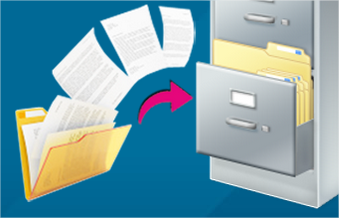
क्या आपको भी हर बार सरकारी काम के लिए अपने ओरिजिनल डॉक्यूमेंट लेकर इधर-उधर भागना पड़ता है… पहचान पत्र, पैन कार्ड, ड्राइविंग लाइसेंस, मार्कशीट… इतने सारे कागज संभालना कितना मुश्किल है ना? तो दोस्तों, भारत सरकार ने इसका एक शानदार solution निकाला है — DigiLocker… यानी आपका Digital Document Locker!
2026 में DigiLocker पहले से कहीं ज्यादा powerful और useful हो गया है… अब इसमें 600 करोड़ से ज्यादा documents store हो चुके हैं और 30 करोड़+ users इसका फायदा उठा रहे हैं… तो आइए जानते हैं DigiLocker के बारे में A to Z जानकारी…
DigiLocker Kya Hai — डिजिलॉकर क्या है?
DigiLocker भारत सरकार की एक free cloud-based digital document storage service है… जो Ministry of Electronics and Information Technology (MeitY) द्वारा “Digital India” programme के तहत चलाई जाती है… इसे पहले “Digital Locker” कहा जाता था, अब इसका official नाम DigiLocker है…
सीधे शब्दों में कहें तो… यह एक ऐसा online locker है जहाँ आप अपने सभी important government documents को digitally store कर सकते हैं… और सबसे अच्छी बात — यहाँ रखे documents legally valid हैं, IT Act 2000 की Section 9 के तहत!
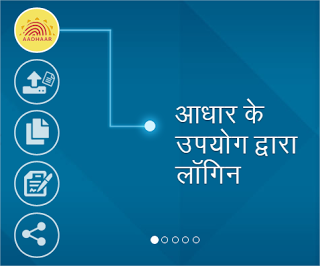
DigiLocker 2026 में नया क्या है?
2026 में DigiLocker में कई नए features आ गए हैं:
1. ABC (Academic Bank of Credits) Integration: अब आपकी सभी academic degrees, diplomas, certificates एक जगह… ABC ID से linked!
2. Aadhaar-based eKYC: Face authentication और Aadhaar OTP से instant verification…
3. Digital Health ID (ABHA): Ayushman Bharat Health Account से linked health records भी DigiLocker में…
4. Vehicle Documents: Driving License, RC, Insurance — सब DigiLocker में… Traffic police को physical copy दिखाने की जरूरत नहीं!
5. 2,500+ Issuer Organizations: CBSE, UGC, Income Tax Department, EPFO, State Governments… सभी DigiLocker से connected!
6. DigiLocker for Business: Companies और organizations के लिए entity-level DigiLocker भी available है अब!
DigiLocker के फायदे — Benefits of DigiLocker 2026
1. कभी भी, कहीं भी Documents Access: आपके documents आपकी जेब में… mobile, laptop, tablet — किसी भी device से access करो…
2. 100% Free Service: कोई charge नहीं… पूरी तरह मुफ्त… government of India की service है!
3. Legally Valid Documents: DigiLocker में store documents IT Act 2000 के तहत original documents के बराबर मान्य हैं…
4. Physical Documents की जरूरत नहीं: सरकारी office हो, bank हो, या कोई भी verification — DigiLocker document दिखा दो, बस!
5. Safe और Secure: Cloud storage with government-level security… AES-256 encryption… आपके documents पूरी तरह सुरक्षित!
6. Paperless India: Environment friendly… no paper waste… digital document sharing!
7. e-Sign Facility: Documents को digitally sign भी कर सकते हो… Aadhaar-based e-Sign से!
8. Auto-fetch Documents: कई documents automatically आपके DigiLocker में आ जाते हैं — जैसे Aadhaar, PAN, Driving License… download करने की जरूरत नहीं!
9. Share Documents Easily: किसी भी organization को document share करना हो तो DigiLocker से directly link भेज सकते हो…
10. 1 GB Free Storage: Personal documents upload करने के लिए 1 GB cloud storage free!
👉 Document Organizer Bag — अपने physical documents भी organized रखें!
DigiLocker में कौन-कौन से Documents रख सकते हैं?
DijiLocker में आप दो तरह के documents रख सकते हैं:
A) Issued Documents (Auto-fetched):
ये documents सीधे issuing authority (सरकारी विभाग) से आपके DigiLocker में आ जाते हैं:
– Aadhaar Card (UIDAI)
– PAN Card (Income Tax Dept)
– Driving License (State Transport)
– Vehicle RC (Registration Certificate)
– Class 10th/12th Marksheet (CBSE/State Boards)
– Degree/Diploma (Universities)
– Insurance Policy (various insurers)
– EPFO documents
– COVID Vaccination Certificate
– Income Tax Returns
– Caste Certificate, Domicile Certificate
– Birth/Death Certificate
B) Uploaded Documents:
जो documents auto-fetch available नहीं हैं, उन्हें आप manually upload कर सकते हैं:
– Passport copy
– Property documents
– Bank statements
– Medical reports
– Employment letters
– Personal photos/scan copies
DigiLocker Account कैसे बनाएं — Step by Step Guide 2026
DigiLocker account बनाना बहुत easy है… बस Aadhaar Card और mobile number चाहिए:
Step 1: DigiLocker app download करें — Google Play Store या Apple App Store से
Step 2: App open करें और “Sign Up” पर click करें
Step 3: अपना Mobile Number enter करें… OTP आएगा, verify करें
Step 4: Aadhaar Number enter करें… Aadhaar से linked mobile पर OTP आएगा
Step 5: Security PIN set करें (6 digit)
Step 6: Username create करें… बस! आपका DigiLocker account ready है!
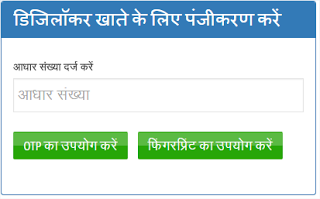
Website से भी बना सकते हैं: https://www.digilocker.gov.in/ पर जाएं और Sign Up करें…
👉 Smartphone for Digital India — सस्ते और अच्छे smartphone जो सभी govt apps चलाएं!
DigiLocker में Document कैसे Add करें?
Method 1: Auto-fetch (Issued Documents)
1. DigiLocker app खोलें
2. “Get Issued Documents” या “Search Documents” पर tap करें
3. Issuing organization select करें (जैसे CBSE, Transport Dept, etc.)
4. Document type select करें
5. Required details enter करें (जैसे Registration Number)
6. Document automatically fetch होकर आपके locker में आ जाएगा!
Method 2: Manual Upload
1. DigiLocker app खोलें
2. “Uploaded Documents” section में जाएं
3. “+” icon या “Upload” button पर tap करें
4. Document select करें (camera से photo लें या gallery से choose करें)
5. Document type select करें
6. Upload पर tap करें… done!
DigiLocker Documents कहाँ-कहाँ Use कर सकते हैं?
2026 में DigiLocker documents इन जगहों पर legally accepted हैं:
– Traffic Police: Driving License और RC DigiLocker में दिखा सकते हैं
– Airport: Identity proof के रूप में DigiLocker Aadhaar valid
– Bank Account Opening: KYC documents DigiLocker से share करें
– Government Offices: सभी सरकारी कार्यालयों में DigiLocker documents मान्य
– College/University Admission: Marksheets और certificates share करें
– Job Applications: Document verification DigiLocker से
– Insurance Claims: Policy documents DigiLocker से share करें
– Passport Application: Supporting documents DigiLocker से
– SIM Card Purchase: Aadhaar-based eKYC via DigiLocker
DigiLocker App कैसे Use करें — Tips and Tricks 2026
Tip 1 — Biometric Lock: App में fingerprint/face lock enable करें… extra security!
Tip 2 — Nomination Feature: DigiLocker में nominee add करें… emergency में documents access!
Tip 3 — QR Code Sharing: Document share करने के लिए QR code generate करें… fast और safe!
Tip 4 — Activity Log Check: समय-समय पर activity log check करें… कौन documents access कर रहा है, पता चलेगा!
Tip 5 — Multiple Languages: DigiLocker Hindi सहित कई Indian languages में available है…
DigiLocker vs Physical Documents — Comparison
| Feature | Physical Documents | DigiLocker |
|---|---|---|
| Safety | चोरी, आग, पानी से damage का risk | Cloud storage — 100% safe |
| Accessibility | घर पर ही available | कहीं भी, कभी भी |
| Legal Validity | Valid | Equally Valid (IT Act 2000) |
| Cost | Photocopy, lamination cost | 100% Free |
| Sharing | Physical delivery करनी पड़ती है | One-click digital sharing |
| Verification | Time-consuming | Instant |
| Environment | Paper waste | Paperless, eco-friendly |
DigiLocker में Common Problems और Solutions
Problem 1: Aadhaar OTP नहीं आ रहा
Solution: Check करें कि Aadhaar से linked mobile number active हो… UIDAI portal पर mobile number update करें
Problem 2: Document fetch नहीं हो रहा
Solution: Issuing authority में आपकी details match होनी चाहिए… spelling, date of birth verify करें
Problem 3: Upload fail हो रहा
Solution: File size 10 MB से कम होनी चाहिए… supported formats: PDF, JPEG, PNG
Problem 4: Account locked हो गया
Solution: “Forgot PIN” option use करें… Aadhaar OTP से reset करें
Problem 5: Document show नहीं हो रहा
Solution: App update करें… cache clear करें… internet connection check करें
DigiLocker Security — कितना Safe है?
DijiLocker बहुत secure है… इसमें कई layers की security है:
– 256-bit SSL Encryption: Data transfer पूरी तरह encrypted
– Aadhaar-based Authentication: OTP verification
– Security PIN: 6-digit PIN protection
– ISO 27001 Certified: International security standards follow
– Government Infrastructure: NIC (National Informatics Centre) द्वारा hosted
– Data stored in India: सारा data Indian servers पर… विदेश में नहीं!
👉 Cyber Security Book Hindi — ऑनलाइन सुरक्षा की पूरी जानकारी हिंदी में!
DigiLocker और ABC (Academic Bank of Credits)
2026 में DigiLocker का सबसे important feature है ABC integration… Academic Bank of Credits एक digital storehouse है जहाँ आपके सभी educational credits store होते हैं… NEP 2020 के तहत अब students multiple universities से credits earn कर सकते हैं और सब DigiLocker में safe!
ABC ID कैसे बनाएं:
1. DigiLocker login करें
2. “ABC” section में जाएं
3. Student details fill करें
4. ABC ID generate हो जाएगी
5. आपकी सभी academic records यहाँ automatically आने लगेंगी!
FAQ — DigiLocker से जुड़े आम सवाल
Q1: क्या DigiLocker पूरी तरह free है?
A: हाँ, बिल्कुल free है… सरकार कोई charge नहीं लेती!
Q2: DigiLocker documents legally valid हैं?
A: हाँ, IT Act 2000 की Section 9 के तहत DigiLocker documents original documents के बराबर legally valid हैं…
Q3: क्या बिना internet के DigiLocker use कर सकते हैं?
A: नहीं, DigiLocker use करने के लिए active internet connection चाहिए… लेकिन आप important documents screenshot या PDF download करके offline भी रख सकते हैं…
Q4: DigiLocker में कितने documents store कर सकते हैं?
A: Issued documents (auto-fetched) की कोई limit नहीं… uploaded documents के लिए 1 GB storage free है…
Q5: क्या Aadhaar के बिना DigiLocker account बना सकते हैं?
A: नहीं, DigiLocker registration के लिए Aadhaar Card mandatory है…
Q6: DigiLocker account delete कैसे करें?
A: Settings > Account > Delete Account… लेकिन delete करने से पहले सोच लें, क्योंकि सारे documents remove हो जाएंगे!
Q7: क्या DigiLocker से driving license traffic police को दिखा सकते हैं?
A: हाँ, Supreme Court ने 2019 में rule दिया था कि DigiLocker में DL और RC valid है… 2026 में सभी traffic police accept करती हैं!
Q8: DigiLocker Helpline क्या है?
A: Email: support@digitallocker.gov.in | Toll-free: 14546 | Website: digilocker.gov.in/contact
तो दोस्तों… अगर आपने अभी तक DigiLocker account नहीं बनाया है तो आज ही बना लो… 2026 में सब कुछ digital हो रहा है और DigiLocker आपके documents को safe और accessible रखने का सबसे आसान तरीका है… अगर यह जानकारी अच्छी लगी तो अपने दोस्तों और family members को भी share करें!